WoW Titan Reforged Ultimate Graphics Boost Guide
Last updated on December 1, 2025 by MMOJUGG Team | Game: WoW Titan Reforged Guide | Tags: WoW Titan Reforged General
WoW Classic Titan Reforged servers, Chrono realm, deliver a fresh take on Azeroth with enhanced mechanics and visuals tailored for dedicated players. While the base experience shines, fine-tuning graphics settings can transform your gameplay—sharper details, immersive environments, and buttery-smooth performance without sacrificing fun. Whether you're raiding or questing, these optimizations make every spell and swing pop.
While you're exploring these tweaks, consider bookmarking MMOJUGG for ongoing insights, and swing by our WoW Classic Titan Reforged Shop to grab a pre-made account for instant access, Titan Reforged gold, boosting services, and more to jumpstart your adventure. If you are interested in WoW Classic Titan Reforged, we highly recommend checking out our comprehensive resource: Complete Guide on How to Play WoW Classic Titan Reforged
MMOJUGG Now Offers:
Fresh Starter Account + One-month subscription | Top-up One-month subscription
Level 80 Account Customize | Level 80 Death Knight Account | Level 80 Mage Account
Core Display Setup
Start by accessing the graphics menu to lay a strong foundation. Push your resolution to the maximum supported by your monitor for crisp edges and expansive views.
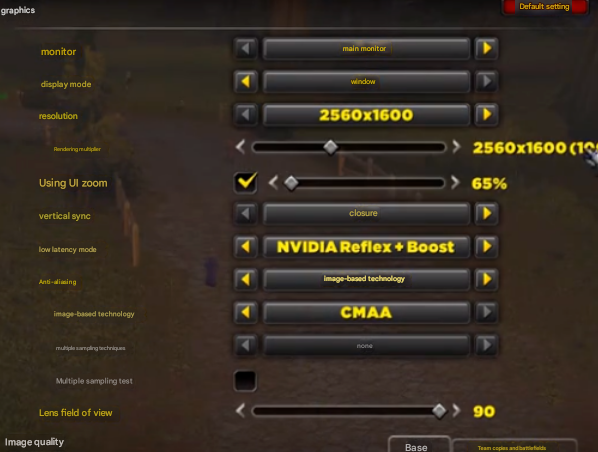
Crank the render scale to 100% to ensure every texture renders at full fidelity, avoiding any blurry compromises. Disable vertical sync to eliminate input lag, and activate low-latency mode—specifically NVIDIA Reflex + Boost if you're on compatible hardware—for responsive controls that feel snappier in intense PvP or boss fights.
Setting | Recommended Value | Benefit |
|---|---|---|
Resolution | Maximum (e.g., 2560x1600) | Sharpest image quality |
Render Scale | 100% | Full detail rendering |
Vertical Sync | Off | Reduced lag |
Low Latency Mode | NVIDIA Reflex + Boost | Optimal responsiveness |
Anti-Aliasing and Field of View Mastery
Smooth out jagged edges with a smart anti-aliasing combo: enable ReX paired with FXAA, then select CMAA as your image-based technique.

This delivers clean lines without tanking frame rates, making distant landscapes and character models look polished. For broader awareness in battles, set the field of view to 90 degrees. To push it further, enter this console command in chat:
/console cameraDistanceMaxZoomFactor 4This macro extends your zoom to the absolute limit, giving you a tactical edge in arenas and raids without zooming hacks.
Balancing Detail and Performance
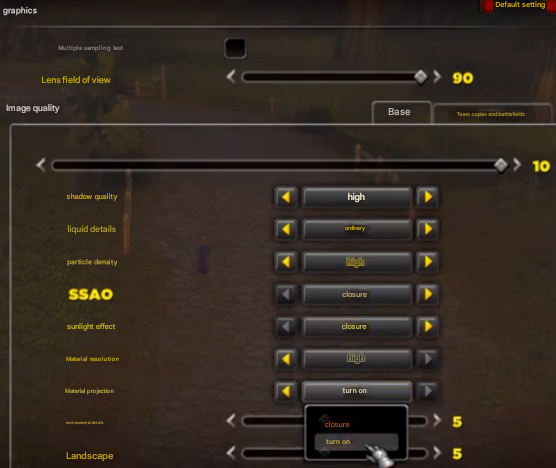
Prioritize shadows on high for dramatic lighting that enhances immersion during night raids or shadowy dungeons. Keep liquid details at normal to maintain realistic water effects without overwhelming your GPU. Boost particle density to high so spells and abilities burst with vibrant chaos. Turn off SSAO and sunlight effects to cut unnecessary computations—these often add noise without much gain on Chrono. Set material resolution to high, enable material projection, and opt for physical rendering on both environment and ground textures for lifelike surfaces that breathe life into Azeroth.
Graphics Quality | Recommended Value | Why It Works |
|---|---|---|
Shadows | High | Deep, realistic shading |
Liquid Details | Normal | Balanced water without excess |
Particle Density | High | Explosive spell visuals |
SSAO | Off | Cleaner performance |
Sunlight | Off | Reduced glare, steady FPS |
Material Resolution | High | Detailed armor and objects |
Material Projection | On | Accurate light on surfaces |
Environment/Ground | Physical | Natural, immersive terrain |
Advanced Tweaks for Peak Rendering
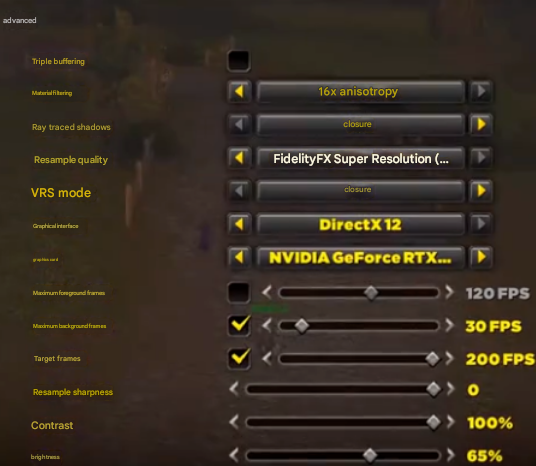
In the advanced section, disable triple buffering to streamline frame delivery. Switch material filtering to 16x anisotropic for razor-sharp textures at any angle—perfect for spotting loot from afar. Shut down ray-traced shadows and set resampling quality around 12 pixels for efficient upscaling. Force your dedicated GPU, cap background frames at 30 FPS to save resources when tabbed out, and target 200 FPS foreground for fluid motion. Dial resampling sharpness to 0 to avoid over-sharpening artifacts.
Advanced Option | Recommended Value | Impact |
|---|---|---|
Triple Buffering | Off | Faster frame pacing |
Material Filtering | 16x Anisotropic | Crystal-clear distant textures |
Ray-Traced Shadows | Off | Performance boost |
Resampling Quality | 12 | Efficient high-res upscaling |
GPU Selection | Dedicated (e.g., RTX) | Full power utilization |
Background FPS Cap | 30 FPS | Battery/heat savings |
Target FPS | 200 FPS | Ultra-smooth gameplay |
Resampling Sharpness | 0 | Natural clarity |
Fine-Tuning Colors for Vibrancy
These post-processing adjustments can double your visual clarity. Set contrast to 100% for punchy contrasts that make enemies stand out. Brightness at 65% keeps scenes balanced without washing out shadows. Gamma at 1.2 brightens the world nicely, but if characters appear overexposed, drop it to 1.0 for a more grounded look.
Color Adjustment | Value | Quick Tip |
|---|---|---|
Contrast | 100% | Highlights details sharply |
Brightness | 65% | Even lighting across scenes |
Gamma | 1.2 (or 1.0 for characters) | Custom brightness preference |
Compatibility for Stability
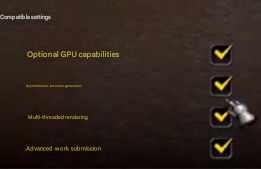
Finally, enable all compatibility options: asynchronous resource generation, multi-threaded rendering, and advanced work submission. These ensure your rig leverages modern hardware fully, minimizing stutters on Chrono during peak hours.
FAQs on WoW Titan Reforged Settings and Graphics
1. Is Chrono server official for WoW Classic Titan Reforged?
Yes, it's China's fully licensed official server by NetEase, not a private one—complete with unique progression and events.
2. Will these settings work on lower-end PCs?
They prioritize balance, but scale down shadows/particles if FPS dips below 60. Test in a low-stakes zone first.
3. How do I reset if something goes wrong?
Hit "Reset to Defaults" in graphics, then reapply step-by-step. The camera macro persists until you log out.
4. Does NVIDIA Reflex require specific hardware?
It shines on RTX/GTX 900+ series; AMD users can use similar low-latency alternatives.
5. Can I use addons with these tweaks?
Absolutely—these are vanilla-compatible and enhance UI mods like ElvUI for even better visuals.
You Might Also Like
Thanks for Reading
Apply these for a jaw-dropping Chrono experience that rivals modern expansions. Stay tuned to MMOJUGG for more WoW Classic Titan Reforged tips!
Looking for more Titan Reforged Guides?
Get exclusive insights into access, server populations, and upcoming phases—all in our comprehensive hub.
👉 Visit Our Titan Reforged Hub WoW Titan Reforged Gold
 WoW Titan Reforged Account
 WoW Titan Reforged Leveling