How to Fix WoW Titan Reforged Auction House Lag
Last updated on December 1, 2025 by MMOJUGG Team | Game: WoW Titan Reforged Guide | Tags: WoW Titan Reforged General

The auction house on WoW Titan Reforged Chrono server has become a notorious bottleneck for players, especially since Thunderforge disabled auction-related addons. Endless loading screens and glitches turn simple material hunts into frustrating ordeals. If you're gearing up for raids or daily crafts, these hiccups hit hard. For seamless gameplay on this official Chinese Titan Reforged server, bookmark our site for ongoing guides, and explore our WoW Classic Chrono Shop for pre-made accounts, Titan Reforged gold, boosting services, and more to jumpstart your progress effortlessly.
If you are interested in WoW Classic Titan Reforged, we highly recommend checking out our comprehensive resource: Complete Guide on How to Play WoW Classic Titan Reforged
MMOJUGG Now Offers:
Fresh Starter Account + One-month subscription | Top-up One-month subscription
Level 80 Account Customize | Level 80 Death Knight Account | Level 80 Mage Account
Understanding the Auction House Struggles
Chrono's auction house woes stem from heavy traffic and addon conflicts. Post-disablement, many players face frozen interfaces, failed searches, and error pop-ups. Online fixes often fall short—pages won't flip, or errors persist—because addons vary wildly across setups. Even seemingly unrelated ones can clash when auction features activate, leaving no universal tweak.
The core issue? High-volume traders overload the system, but blanket addon bans affect everyone. This forces creative workarounds to restore fluid buying and browsing.
Method 1: Go Addon-Free for Pure Functionality
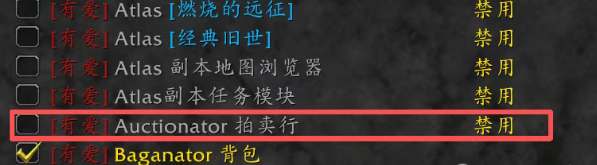
Stripping all addons returns the auction house to its vanilla state—reliable and lag-free. Here's the streamlined process:
Disable every addon via the character selection screen or in-game menu.
Enter the auction house and search for your material.
Click the gear icon in the top-right corner.
Select "Buyout" for instant grabs or "Unit Price" to sort by cheapest per item.
This setup highlights the lowest unit prices upfront, dodging overpriced stacks. No more sifting through inflated listings.
Sorting Option | Benefit | Ideal For |
|---|---|---|
Buyout | Quick purchase at fixed price | Bulk buys without bidding wars |
Unit Price | Reveals true value per item | Smart shopping on materials like herbs or ore |
Players worry about the hassle of toggling addons repeatedly, but most suites (like those popular on Chrono) include profile-saving. Set an "AH-only" config, export it, and reload in seconds. It's a one-time setup for permanent smoothness.
Method 2: Leverage an Alt for Dedicated Trading
For those glued to their main's full addon loadout, designate a lowbie alt as your auction specialist. Keep it addon-free:
Log into the alt in a major city.
Perform all searches and buys as above.
Mail items to your main—Blizzard's in-game post arrives instantly across Battle.net accounts.
This keeps your primary character optimized for dungeons or PvP while outsourcing trades. No plugin swaps needed, and alts level passively via rested XP.
Compare Both Methods
Method Comparison | Pros | Cons | Best For |
|---|---|---|---|
Disable All Addons | Zero lag, simple sorting | Brief setup time | Solo players with few alts |
Alt Character | Main stays fully addoned | Needs spare account slot | Heavy raiders/PvP mains |
Both approaches deliver silky transactions, outpacing glitchy alternatives.
The Hidden Pain: Selling Items Efficiently
Buying shines with these fixes, but selling drags. Without addons, you're manually listing each stack—scanning prices, typing values, and confirming one by one. It's tedious for farmers dumping ore or glyphs.
This imbalance favors "goblins"—those bulk manipulators crashing the house with spam listings. Everyday crafters foot the bill for their dominance.
A Call for Lasting Solutions
These hacks are stopgaps until Thunderforge and Blizzard overhaul the system. Deeper fixes like queue limits, anti-spam tools, or addon whitelisting would empower all players without punishing the masses. Until then, master these for a competitive edge on Chrono.
FAQs on WoW Titan Reforged Auction House Lag
1. Why did Thunderforge disable auction addons on Chrono?
To combat severe lag from overuse, but it inadvertently hampers legitimate players.
2. Does disabling addons affect my entire WoW session?
No—toggle them off just for auction house visits and reload profiles afterward.
3. Can I use these methods on other Titan Reforged servers?
They're tailored for Chrono but work anywhere with similar restrictions.
4. How do I create a trading alt quickly?
Boost one via our shop or level naturally; any low-level toon suffices.
5. Will Blizzard revert the addon ban soon?
No official word, but community pressure may push targeted improvements.
You Might Also Like
Thanks for Reading
Stay tuned to MMOJUGG for more Chrono insights and pro tips.
Looking for more Titan Reforged Guides?
Get exclusive insights into access, server populations, and upcoming phases—all in our comprehensive hub.
👉 Visit Our Titan Reforged Hub WoW Titan Reforged Gold
 WoW Titan Reforged Account
 WoW Titan Reforged Leveling