Path of Exile 2 Stash Tabs Affinities Master Guide
Last updated on May 23, 2025 by MMOJUGG Team | Game: PoE2 (Runes of Aldur 0.5.0) Guide |
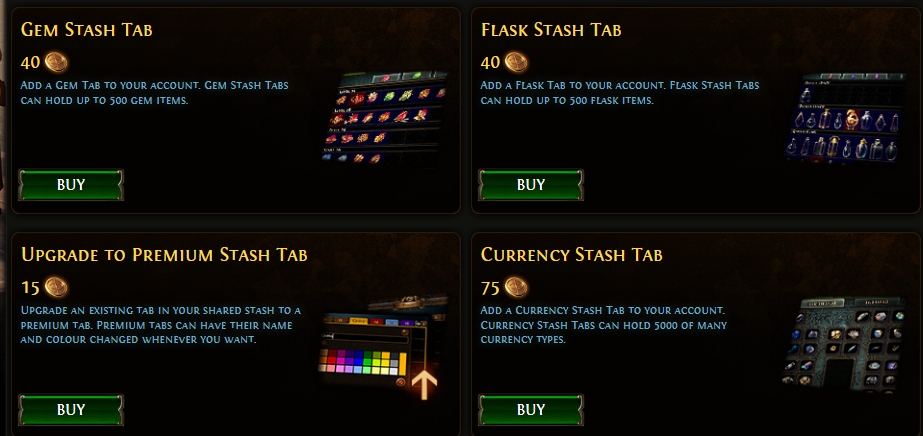
If you're diving into the chaotic world of Path of Exile 2 (POE2), you know that managing your inventory can feel like wrestling a pack of angry porcupines. But fear not—affinities are here to save the day, and we're breaking it all down in a way that's easy to grasp and quick to apply. By mastering stash tab affinities, you'll cut down on tedious sorting and focus on what matters: slaying monsters and looting epic gear. Want to stay ahead of the grind? Please bookmark our site for more Path of Exile 2 tips and tricks, and swing by our store for gear to level up your gaming experience.
What Are Affinities in Path of Exile 2?
Think of affinities as your personal stash tab assistants. They're like labels you slap on specific stash tabs to tell the game, “Hey, only put my essences here!” or “This tab is for uniques only.” By assigning affinities, items automatically sort themselves into the right tabs when you pick them up, saving you from the nightmare of manual organization. Whether you're juggling runes, skill gems, or socketables, affinities streamline your inventory management.
How to Set Up Affinities for Maximum Efficiency
Setting up affinities is as simple as a right-click. Here's how to do it:
Open Your Stash: Head to your stash in-game and take a look at your tabs.
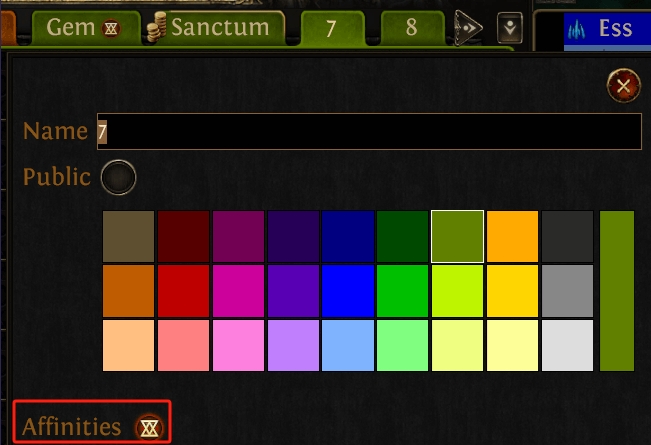
Assign an Affinity: Right-click a stash tab and select an affinity type, like currencies, essences, or deliriums. Once set, that tab will only accept items of that type.
Check the Affinity Logo: After assigning an affinity, you'll see a small logo next to the tab's name, confirming it's ready to auto-sort.
For example, if you assign a tab to socketables, any socketable items you pick up will zip straight to that tab. No more digging through a cluttered stash to find your gear.
Why Affinities Are a Game-Changer
Imagine you're out farming, your inventory overflowing with loot—runes, waystones, uniques, you name it. Without affinities, you'd be stuck manually dragging each item to its proper tab. With affinities, you click the item, and it hops to the right tab like magic. You can even jump between tabs without worrying about order. Need to sort runes, then switch to deliriums? The game handles it for you, saving you precious minutes every session.
This system shines when you're managing multiple item types. Got a tab for potions? Skill gems? Affinities ensure everything lands where it belongs, leaving you more time to plan builds or hunt for that next big drop.
Overriding Affinities for Special Items
Sometimes, you'll loot something too valuable to toss into a shared affinity tab—like a rare Dextro Erasia worth multiple divines. No problem! You can override the affinity system by manually dragging the item to a different tab. On PC, left-click and drag (or control-click for precision). Console players might use a different button, but the principle is the same: manually place the item to bypass the auto-sort. This gives you full control over your prized loot without disrupting your setup.
Which Stash Tabs Are Worth It?
Not all stash tabs are created equal. If you're new or working with limited tabs, prioritize affinities for high-frequency items like currencies, essences, and skill gems. These will save you the most time during farming. Some tabs, however, might not be worth the investment—check out our other guides for a breakdown of the best stash tabs for your buck.
Tips for Building Your Own Affinity System
Even if you don't have a sprawling guild stash, you can create an efficient system with just a few tabs. Start by assigning affinities to your most common loot types. For example:
One tab for currencies (chaos orbs, divines, etc.).
One for essences or runes.
One for uniques or socketables.
As you expand your stash, add more specialized tabs for things like potions or ritual items. The key is to match your affinities to your playstyle—focus on what you loot most often.
FAQs About Path of Exile 2 Affinities
What happens if I don't assign affinities to my stash tabs?
Without affinities, you'll need to manually sort items into tabs, which can be time-consuming, especially during heavy farming sessions.
Can I change an affinity after setting it?
Yes! Right-click the tab again and select a new affinity or remove it entirely to make it a general-purpose tab.
Do affinities work on all platforms?
Absolutely, affinities function on PC and consoles, though the controls for overriding affinities may differ slightly.
How many stash tabs do I need for affinities to be functional?
Even two or three tabs with affinities can make a big difference. Prioritize tabs for your most common items first.
Can I use affinities in shared guild stashes?
Yes, but be cautious with valuable items. Manually override affinities to keep high-value loot in a personal tab.
Thanks for Reading
Mastering affinities in Path of Exile 2 is like hiring a personal organizer for your loot. You can transform your stash into a well-oiled machine with a few clicks, saving hours of frustration. Keep following MMOJUGG for more tips on dominating Wraeclast!
Table of Content
 Buy PoE2 Currency
 PoE2 Boosting