Optimize Path of Exile 2 Settings for Smooth Gameplay
Last updated on September 29, 2025 by MMOJUGG Team | Game: Path of Exile 2 Guide | Tags: PoE2 Setting Optimization
Path of Exile 2 is an immersive action RPG that captivates players with its deep mechanics and stunning visuals. To truly elevate your gameplay, tweaking the right settings and mastering features like weapon sets and item filters can make all the difference. Whether you're dodging crashes, optimizing visuals, or switching between weapon sets for maximum damage, this guide covers everything you need to know to enhance your adventure in Wraeclast. For more tips, builds, and premium in-game items like divine orbs, crafting currency, and rare BiS gear, consider bookmarking our Path of Exile 2 shop at MMOJUGG for all your gaming needs.
Graphics Settings for Stability and Performance
Getting the most out of Path of Exile 2 starts with fine-tuning your graphics settings to balance performance and visuals. Here's how to optimize your setup:
Graphics API: If you're experiencing crashes, switch from Vulkan to DirectX 11 or 12. Vulkan works well for many, but testing different APIs can stabilize your game. For example, switching to Vulkan resolved persistent crashing issues for some players.
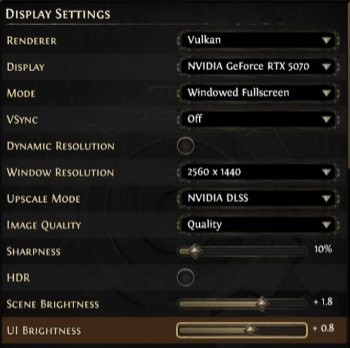
Full Screen vs. Windowed: Full-screen mode often improves performance, but windowed full-screen allows faster alt-tabbing, which is ideal for multitasking or streaming.
Vertical Synchronization (V-Sync): Disable V-Sync to reduce input lag, as it can delay character movement slightly after commands. This is especially noticeable in fast-paced combat.
Upscale Mode and Scene Brightness: Adjust the upscale mode according to your hardware for sharper visuals. Scene brightness at around 1.8 can illuminate darker areas, while UI brightness at 0.8 ensures clarity without being overwhelming. Adjust these based on your monitor for the best experience.
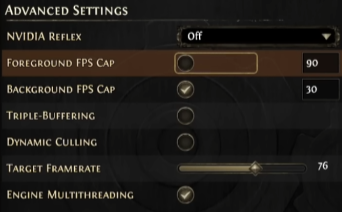
Frame Rate Cap and Dynamic Culling: Cap your FPS (e.g., 90 FPS) to maintain stability, especially if streaming or recording. Dynamic culling helps maintain frame rates during intense fights by reducing visual quality slightly, making it perfect for keeping gameplay smooth when explosions fill the screen.
Engine Multi-Threading: Keep this enabled for better performance, as it leverages your CPU's multi-core capabilities.
Nvidia Reflex: If you have an Nvidia GPU, enabling Reflex can reduce latency, but test it to ensure it suits your setup.
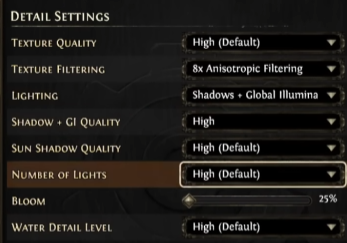
Experiment with these settings to find the optimal balance for your system, ensuring smooth gameplay without compromising visuals.
Gameplay Settings for a Cleaner Experience
Path of Exile 2's gameplay settings can drastically improve your efficiency and enjoyment. Here are the must-know tweaks:
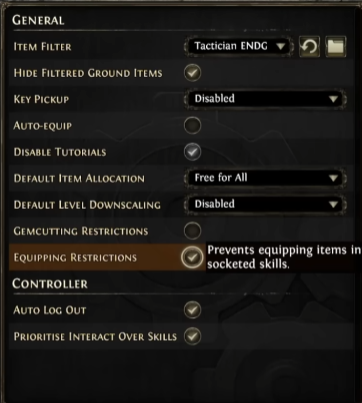
Item Filters: Item filters are a game-changer, hiding low-value items like small gold pouches to reduce screen clutter and highlight valuable currency like chaos orbs or divine orbs. You can find custom filters online or join communities (like Discord servers) for class-specific leveling and endgame filters. Strict filters with subtle highlights keep your screen clean without distracting neon effects.
Hide Filtered Ground Items: Enable this to remove filtered items from rendering, reducing strain on your CPU and GPU for better performance.
Key Pickup and Auto-Equip: Disable auto-equip to avoid accidentally equipping suboptimal gear. Key pickup is optional but rarely needed for experienced players.
Party Settings: For group play, choose permanent allocation to secure your loot, or opt for free-for-all if playing with trusted friends. Disable default level downscaling to maintain your character's power when helping lower-level friends defeat bosses.
Skill Requirements Warning: New players should keep this enabled to avoid equipping gear that disables skills due to unmet stat requirements (e.g., strength or dexterity). However, veterans can disable it to learn game mechanics more quickly by understanding why skills are deactivated.
Show Life/Mana Levels and Mini Life Bar: Always display exact life, mana, and shield values for precise resource management. Enable the mini life bar above your character to monitor health without glancing at the screen's bottom, especially in chaotic fights.
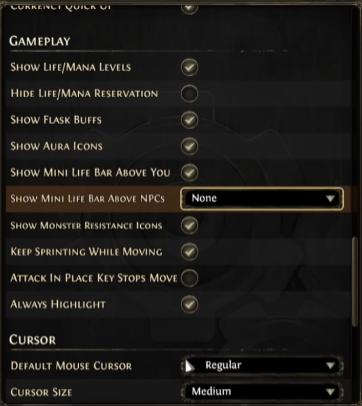
Monster Resistance Icons: Enable this to see enemies' resistances (e.g., fire or cold vulnerabilities), allowing you to tailor your damage type for maximum efficiency.
Sprint and Attack in Place: The “keep sprinting while moving" option enables continuous sprinting without needing to hold the button, making it ideal for fast-paced exploration. “Attack in place" depends on your control preference—test it to see what feels natural.
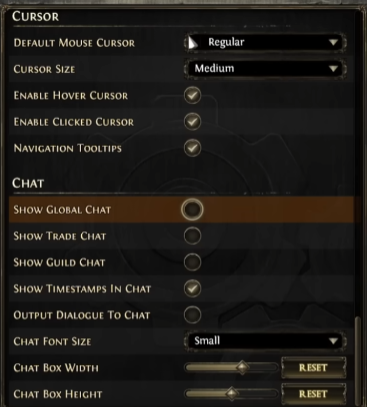
These settings streamline your gameplay, letting you focus on slaying monsters and collecting loot.
Mastering Weapon Sets for Build Versatility
Path of Exile 2's weapon set system is a powerful tool for diversifying your build without needing multiple weapons. Here's how to make the most of it:
Shared Weapon Sets: By default, weapon sets are tied to different weapons, but the “share weapon set" option lets you use the same weapon (e.g., a crossbow) across both sets. On a controller, hold the designated button to share; on mouse and keyboard, right-click the weapon set and select “lock to all weapon sets." This eliminates the need for a second weapon while retaining flexibility.
Allocating Passive Points: Each weapon set has its own passive skill tree points (up to 24 after the campaign). You can allocate points differently for each set, such as boosting damage for one skill (e.g., +10% damage for Plasma Blast) or enhancing utility like mana recovery for another. Note that jewel nodes and major nodes like Glancing Blows can't be used for weapon set points.
Skill Binding: Assign specific skills to each weapon set for seamless switching. On a controller, navigate to the skill bind menu, select advanced information, and assign skills like Galvanic Shards to weapon set 1 and Plasma Blast to weapon set 2. On mouse and keyboard, click the arrow next to a skill to choose its weapon set. This allows you to switch between, say, lightning and ice builds for different scenarios.
Practical Example: Imagine using weapon set 1 for lightning skills with electrocute bonuses and weapon set 2 for ice skills with glaciation effects. Switching sets lets you adapt to enemy resistances or playstyle needs instantly, boosting your damage per second (DPS) and survivability.
This system adds incredible depth, letting you experiment with builds without swapping gear constantly.
Interface and Map Settings for Clarity
A clean interface and clear map are crucial for navigating Path of Exile 2's complex world:
Clock and Quest Tracking: Enable the in-game clock to track playtime and stay hydrated. Disable quest tracking in the endgame to reduce screen clutter, as you can check quests via the map menu.
Map Settings: Display the corner map for constant awareness, but set landscape transparency to its minimum and map transparency to its maximum for clarity. Adjust map zoom to your preference, and enable point-of-interest names to locate NPCs or objectives easily.
Item Information: Always show sockets to avoid selling valuable items. Enable advanced info/inspect mode (especially on controllers) to view detailed item stats like prefixes and suffixes. Hide “remove only" stash tabs to declutter your inventory after leagues end.
Currency and Flask Buffs: Enable currency on strongboxes for quick enchanting. Show all buff icons (e.g., heralds or flasks) to monitor active effects and learn their impact.
These tweaks keep your interface intuitive and your map readable, saving time and frustration.
Controller vs. Mouse and Keyboard
Path of Exile 2 supports both controller and mouse-and-keyboard inputs, each with unique considerations:
Controller: The gamepad HUD is exclusive to controllers and doesn't fully support mouse inputs for menus. Assigning skills to weapon sets requires navigating the skill bind menu's advanced options, which can be clunky but effective once mastered.
Mouse and Keyboard: Switching weapon sets and assigning skills is simpler—just right-click to share weapon sets and use the skill menu's arrows to allocate skills. The interface is more flexible, but you miss the gamepad HUD's unique aesthetic.
Test both inputs to determine which one suits your playstyle, as each offers distinct advantages.
FAQs About Path of Exile 2 Settings for Boosting Gameplay
Why does my game keep crashing, and what can I do to fix it?
Crashes are often tied to the graphics API. Try switching between Vulkan, DirectX 11, or DirectX 12 to find the most stable option for your system.
How do item filters improve gameplay?
Item filters hide low-value items and highlight valuable currency, reducing clutter and helping you focus on worthwhile loot.
What's the benefit of sharing weapon sets?
Sharing weapon sets lets you use one weapon across two passive skill trees, enabling versatile builds without needing extra gear.
Should I keep the skill requirements warning on?
New players should keep it on to avoid disabling skills, but experienced players can turn it off to learn stat requirements faster.
How do I make the map easier to read?
Set the landscape transparency to its minimum, map transparency to its maximum, and enable point-of-interest names for improved visibility.
Thanks for Reading
Path of Exile 2's depth is both its challenge and its charm. By optimizing graphics, gameplay, and interface settings, and mastering weapon sets, you can transform your experience into something smoother, more enjoyable, and more effective. Stay tuned to MMOJUGG for more guides, builds, and premium items to fuel your Wraeclast adventures.
 Buy PoE2 Currency
 PoE2 Boosting