Mastering Asynchronous Trade in Path of Exile 3.27
Last updated on October 31, 2025 by MMOJUGG Team | Game: Path of Exile Guide | Tags: Keepers of the Flame
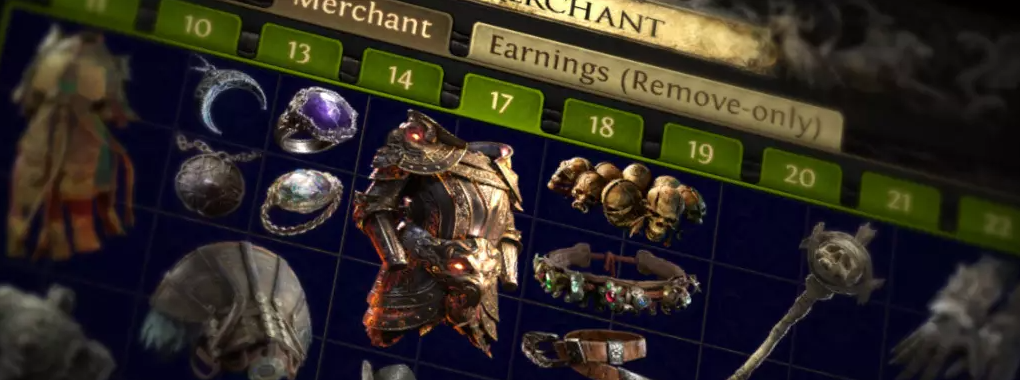
Path of Exile has always thrived on its deep economy and trading systems, but patch 3.27, Keepers of the Flame, takes things to a whole new level with the introduction of asynchronous trade. Borrowed straight from the success of Path of Exile 2, this feature lets you buy and sell gear without the endless whispering or waiting for responses. Imagine wrapping up a farming run, dumping your loot into a shop tab, logging off for the night, and waking up to a stash full of currency—it's that seamless. Whether you're a veteran exiler chasing mirror-tier profits or a newcomer just trying to snag a leveling bow, this system is a game-changer for efficiency.
If you're diving into the league and want to stay ahead of the curve, consider bookmarking MMOJUGG as your go-to spot for PoE breakdowns—it's packed with guides like this. And while you're at it, pop over to our Path of Exile Shop to grab essentials like Chaos Orbs, Divine Orbs, Exalted Orbs, crafting currencies, rare items, uniques, and beyond. It'll give your build the edge without the grind.
A Quick Refresher on Currency Exchange
Before we dive into the shiny new async trading, let's touch on the foundation: the Currency Exchange. In Path of Exile, this has been a staple for years, handled by NPCs like the trade sisters. It lets you swap currencies at market-driven rates—say, turning your stack of Chaos Orbs into Divine Orbs with a few clicks. No haggling, just instant exchanges based on real-time ratios. It's straightforward: input what you have, select what you want, and hit confirm. This pairs perfectly with async trade, making currency management a breeze as you focus on looting.
Unlocking Asynchronous Trade in Keepers of the Flame
You'll gain access to this system early in your campaign—specifically in Act 6, when you reach Lioneye's Watch and meet Faustus. He's your new best friend, stepping in as the steward for your Merchant's Tabs. Interact with him to activate the feature, and suddenly, your trading life gets a massive upgrade. Faustus mirrors the role of similar NPCs in Path of Exile 2, handling both currency swaps and item sales on your behalf.
From there, it's all about preparation. Head to the in-game store or your account page on the official website to grab or convert tabs. Merchant's Tabs aren't free—they run about 40 points each (roughly $4 USD at current rates), but they're worth every point for the freedom they unlock.
Setting Up Your Merchant Shop
The heart of async trade is your Merchant's Tabs, which let Faustus manage your listings 24/7. If you've been playing for a while, dust off those old Premium Stash Tabs (the standard 4x8 ones, not quad layouts). These are prime for conversion—no need to buy fresh if you've got a stash from back in the day.
To convert:
Log into your Path of Exile account on the website.
Navigate to the "Manage Tabs" or "Merchant Tab Upgrade" section.
Select a Premium Stash Tab from your inventory.
Hit "Upgrade to Merchant's Tab"—it'll yank the tab from both PoE 1 and PoE 2, turning any contents into a temporary "Remove-Only" tab so you can salvage your gear without loss.
Once upgraded, these tabs appear in Faustus's interface. You can now drag items straight from your stash, set prices, and let the system do the rest. Pro tip: Start with 2-3 tabs for basics like bases, maps, and mid-tier uniques—scale up as your farm ramps.
Listing Items
Listing is where the magic happens. After a boss rush or map clear, control-click your loot into the Merchant's Tab via Faustus. Right-click each item to assign a price in any currency—Chaos, Exalts, Mirrors, you name it. Want to bulk-list 10 Heavy Belts at 18 Valour Orbs each? No sweat; the interface supports quick duplicates.
A few quirks to note:
Initial Flexibility: Fresh listings have a 10-30 second grace period to tweak prices. Use tools like Awakened PoE Trade or the official trade site for quick checks—expect a day or two post-launch for third-party apps to fully sync.
The Lock Mechanism: After that window, items lock for 5 minutes. No edits, no removals—it's trade-locked to prevent flip-flopping. Double-check values upfront to avoid regrets.
Offline Power: Once listed, sales happen whether you're online or not. Farm Blight for endless bases? Dump 'em in, hit the hay, and check Faustus in the morning for a dividend payout.
This setup shines for repetitive farms. Scarab precursors, modded maps, or even low-tier uniques like Quill Rain become effortless to offload, turning hours of grinding into passive income.
Buying Items
On the buyer side, async trade eliminates the "one chaos, no response" nightmare. Fire up the trade site, filter for "Instant Buyout" (or mix with in-person if you prefer), and search away—bases, rings, whatever.
Here's the flow:
Spot a deal, like a Breach Ring for a steal.
Click "Travel to Hideout"—your character portals directly there.
Faustus (or the seller's equivalent) highlights the item; one button buys it, deducting currency from your tab automatically.
It does nibble at your gold stash—budget a bit for transactions, especially early league. But the speed? Revolutionary. Snag eight-mod maps or a stack of bases without 50 micro-trades. Blight farmers and map juicers will love bulk-buying from overloaded shops.
Pros, Cons, and Smart Strategies
Upsides:
Time Savings: No more AFK whispers or stalled sessions—trade on your schedule.
Market Dynamics: Low/mid gear tanks faster as everyone floods the market, but high-end holds value. Late-league starters win big on cheap rolls.
Profit Potential: I've seen farms explode in profitability; wake up to divines from overnight sales.
Downsides:
Tab Investment: That $4 per tab adds up—prioritize if you're budget-conscious.
Gold Dependency: Farm gold via league mechanics to keep buys flowing.
Self-Scam Risks: Bulk listings mean easy misclicks. Always verify the highlighted item before confirming—scan for outliers like a 1c belt amid 18-valour stacks.
Strategies to max it:
Organize tabs thematically (e.g., one for bases, one for crafts).
For scam-proofing, segregate currencies: Keep Divines in a separate tab, only stocking what you need per buy.
Late-league? Race-to-the-bottom pricing on commons lets you gear alts dirt-cheap.
Overall, this system has transformed Path of Exile for the better, making it more accessible without diluting the grind's thrill.
FAQs on Asynchronous Trade in PoE 3.27 Keepers of the Flame
When does asynchronous trade unlock in Keepers of the Flame?
It becomes available in Act 6 upon meeting Faustus in Lioneye's Watch.
How much do Merchant's Tabs cost?
Each tab costs around 40 points in the store, equivalent to about $4 USD.
Can I convert existing stash tabs to Merchant's Tabs?
Yes, Premium Stash Tabs (standard size) can be upgraded via your account page on the PoE website.
What happens to items in a tab I convert?
Contents move to a "Remove-Only" tab, allowing safe retrieval without loss.
How long can I edit prices after listing?
You have 10-30 seconds before the item locks for 5 minutes—no changes during lock.
Does buying require gold?
Yes, transactions deduct a small gold fee; farm it through league activities.
Can I buy items offline as a seller?
Absolutely—listings sell 24/7 via Faustus, even if you're logged off.
How do I avoid self-scams when bulk-buying?
Always confirm the highlighted item and scan prices before clicking buy.
Will third-party tools like Awakened PoE Trade support this?
Yes, but expect a short delay post-launch for updates—use the official trade site initially.
Is async trade better for farming bases or maps?
It's ideal for both; bulk-list your drops and search for modded maps without trade hassles.
Thanks for Reading
There you have it—a deep dive into making Keepers of the Flame your most profitable league yet. Keep an eye on MMOJUGG for ongoing updates, builds, and economy tips as the patch unfolds. Exile on!
 Buy Path of Exile Currency