Last Epoch Stash Tab Guide: Easy Auto-Sort Setup
Last updated on May 23, 2025 by MMOJUGG Team | Game: Last Epoch Guide |
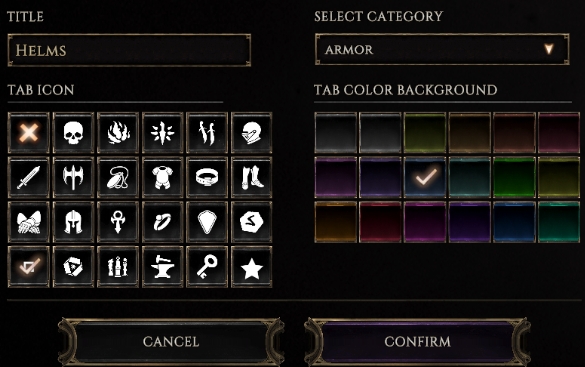
If you're diving into Last Epoch and feeling overwhelmed by a cluttered stash, the game's tab priority system is your new best friend. Introduced in a recent expansion, this feature lets you easily auto-sort your loot, saving time and keeping your inventory tidy. Whether you're a Circle of Fortune enthusiast or want to streamline your gameplay, this guide will walk you through setting up an efficient stash system with a touch of flair. For more gaming tips and gear, consider bookmarking our site and checking out our store for exclusive Last Epoch goodies!
How to Setup a Nice Stash Tab
A well-organized stash is a game-changer in Last Epoch. The tab priority system automatically lets you categorize items like uniques, idols, and crafting materials. No more digging through piles of loot to find that one exalted axe! Plus, the system works across tabs, and the search function helps you pinpoint specific items quickly. Let's break down how to set it up step-by-step, with some practical tips to make your stash work for you.
Step 1: Create a Dump Tab
Start with a dump tab—a catch-all for items that don't fit specific rules. Set this tab with no priority rules so it grabs anything that doesn't belong elsewhere. For example, if your unique armor tab is full, overflow items land here, signaling you to expand or reorganize. You can also use this tab for miscellaneous items like rare gear with unique mods you want to shatter or save for later.
Pro Tip: Add a symbol to your dump tab for quick visual recognition. Type a space in the tab name, pick a color and symbol, and confirm—it's a sleek way to keep things tidy without bulky labels.
Step 2: Set Tab Priorities (Left to Right)
The tab priority system sorts items from left to right, so place your most specific tabs on the left and less specific ones on the right. Here's how to structure it:
Specific Tabs: Create tabs for precise item types, like “One-Handed Axes (Exalted)” or “Body Armor (Unique).” For example, set a tab with priority “Type: One-Handed Axe, Rarity: Exalted.” If an exalted one-handed axe drops, it'll go straight to this tab.
General Tabs: Further right, set tabs for broader categories, like “Exalted Weapons (Any)” or “Jewelry (Exalted).” These catch items that don't fit your specific tabs.
Overflow Tab: Place an “Any Exalted” tab at the far right to catch exalted items that don't match other rules. If this fills up, items go to your dump tab, alerting you to adjust your setup.
Example Setup:
Tab 1: One-Handed Axes (Exalted)
Tab 2: Two-Handed Weapons (Exalted)
Tab 3: Exalted Weapons (Any)
Tab 4: Jewelry (Exalted)
Tab 5: Any Exalted (Overflow)
Tab 6: Dump Tab (No Priority)
This ensures items flow to the most specific tab first, keeping your stash organized.
Step 3: Handle Special Items
Some items, like Harbinger items or Weaver's Will uniques, need extra care due to limited filtering options:
Harbinger Items: These don't have specific base filters yet, so create a manual tab with no priority and drop them there yourself. They stand out visually, making them easy to spot.
Weaver's Will Uniques: These can be tricky since they count as legendaries once revealed. Set a tab for “Unique, Weaver's Will: Max 1” to catch unrevealed Weaver's Will items. Place it to the right of regular unique tabs, but left of legendary tabs. Create a “Legendary” tab with no Weaver's Will restriction for fully revealed Weaver's Will items.
Example:
Tab 1: Unique (Legendary Potential 2+)
Tab 2: Unique (Weaver's Will: Max 1)
Tab 3: Legendary (No Weaver's Will Limit)
Tab 4: Set Items
This setup keeps Weaver's Will items from clogging your unique tabs while ensuring legendaries land correctly.
Step 4: Organize Idols Efficiently
Idols are small but mighty, and sorting them smartly saves time when hunting for resistances. Here's a simple approach:
Small/Minor Idols: Combine these in one tab (Type: Idol, Subcategory: Small/Minor) since they fill the same 1x1 slots. This makes searching for resistances like poison or fire easier.
Medium/Stout Idols: Create a separate tab for these vertical idols (Type: Idol, Subcategory: Stout).
Class-Specific Idols: Set a tab for “Idol, Class: Primalist” or “Idol, Grand+” for class-specific idols. You can refine further by class if you're a hoarder.
Search Tip: Use the search bar to find specific resistances (e.g., “poison resist”) or check vitality idols for poison and necrotic boosts.
Step 5: Manage Uniques and Sets
Uniques and sets have their own quirks, especially with legendary potential (LP) and crafted items:
Legendary Potential: Create tabs like “Unique, LP 2+” or “Unique, LP 1” to sort by potential. Add a “Weaver's Will: Max 0” rule to prevent Weaver's Will items from sneaking in.
Set Items: Use a “Set” tab for pure set items. Crafted set items (reforged) may land here, which is fine for tracking set builds.
Manual Tabs: For specific uniques like Exanguinous, use a no-priority tab and sort manually for crafting projects.
Step 6: Troubleshooting Quirks
The system isn't perfect, and some items may slip through:
Full Tabs: If a tab is full, items go to the dump tab. Check your dump tab regularly to spot overflow and add new tabs as needed.
No Rules: Items like shields or quivers without specific rules land in the dump tab. Use this to identify gaps in your setup.
Search Function: Use the search bar to track down misplaced items, like axes across all tabs.
FAQs About Last Epoch Stash Sorting
What is the dump tab, and why do I need one?
A dump tab with no priority catches items that don't fit other tab rules, helping you spot overflow or missing rules.
How do I prioritize tabs correctly?
Place specific tabs (e.g., “Exalted One-Handed Axe”) on the left and general tabs (e.g., “Any Exalted”) on the right, as the system checks left to right.
Can I auto-sort Harbinger items?
Currently, Harbinger items lack specific base filters, so you can sort them yourself by using a manual tab with no priority.
How do I organize idols for resistances?
Combine small/minor idols in one tab for easy resistance searches, and use separate tabs for stout or class-specific idols.
What happens if my unique tab fills up?
Overflow uniques go to the dump tab or an “Any Exalted” overflow tab if set up, signaling you to add more tabs.
Thanks for Reading
The Last Epoch stash priority system is a massive quality-of-life upgrade, and with a bit of tinkering, you can make it work like a charm. Stay tuned to MMOJUGG for more tips and tricks to level up your gaming experience!
Table of Content
 Buy Last Epoch Gold
 Last Epoch Items