How to Use the Dune Awakening Blueprint System
Last updated on June 10, 2025 by MMOJUGG Team | Game: Dune Awakening Guide | Tags: Dune Awakening Crafting
Dune Awakening brings a thrilling survival MMO experience to the deserts of Arrakis, and its blueprint system is a standout feature for base builders. Whether you're aiming to rebuild your stronghold elsewhere, share designs with allies, or cash in Solaras by selling at the auction house, this tool promises to simplify and enhance your gameplay. But how well does it work? Follow this how-to guide to unlock the power of the blueprint system, understand its mechanics, and navigate its quirks for a seamless building experience. For more tips and gear to conquer the sands, please bookmark our site and explore our Dune Awakening Solari and Spice store!
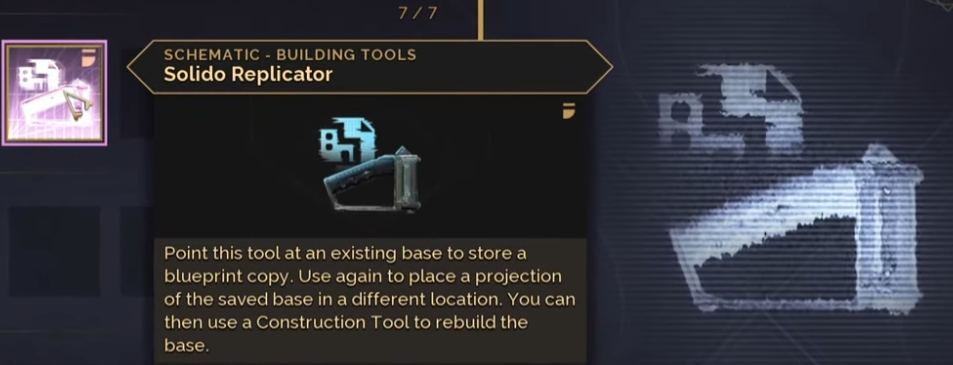
How to Unlock and Craft the Solido Replicator
Get started with the blueprint system by crafting the key tool:
Progress in Building: First, learn to construct a base in Dune Awakening—start with foundations, walls, and your preferred layout.
Unlock the Schematic: In the Research menu, locate and unlock the Solido Replicator schematic, the essential device for copying base designs.
Craft the Tool: Build the Solido Replicator—it's cheap to make, so that you can craft multiple for extra blueprint copies.
Permission Check: Ensure you're the owner or co-owner of the base, as lower permission levels can't copy blueprints.
Pro Tip: The Solido Replicator only captures building pieces (walls, foundations, etc.), not workstations or placeables, so focus on the structure itself.
How to Copy and Store Your Base Blueprint
Once you've got the tool, here's how to save your creation:
Equip the Solido Replicator: Hold the tool and target your base.
Copy the Design: Click the left mouse button to capture the blueprint. You'll see options to place it immediately or forget it.
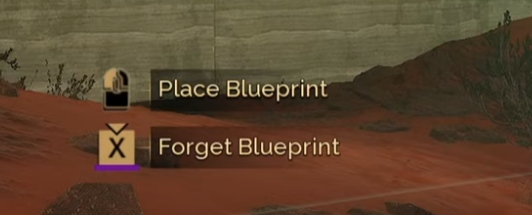
Store It Safely: The blueprint stays in the Solido Replicator if you unequip it. You can also move it to your inventory or a storage chest.
Preview and Rename: Press “Y" for a 3D preview of your base—super cool for checking the design! Rename it here for easy tracking, especially if selling at the CHOAM Exchange.
Make Multiple Copies: Craft additional Solido Replicators to store more copies of the same or different designs.
Pro Tip: A clear name (e.g., “Pillar Fort" or “Desert Bunker") helps when trading or managing a collection of blueprints.
How to Place and Build from a Blueprint
Ready to rebuild? Here's the process:
Claim Land: Head to a new location and claim a piece of land with your Sub-Fief Console.
Equip and Position: Equip the Solido Replicator, select your blueprint, and a holographic outline appears.
Check Placement: Walk around to ensure the spot works—watch how it adapts to terrain! Pillars or foundations may auto-adjust for inclines or uneven ground.
Confirm and Build: Confirm placement (this consumes the Solido Replicator), then switch to your Construction Tool to fill holograms with materials as usual.
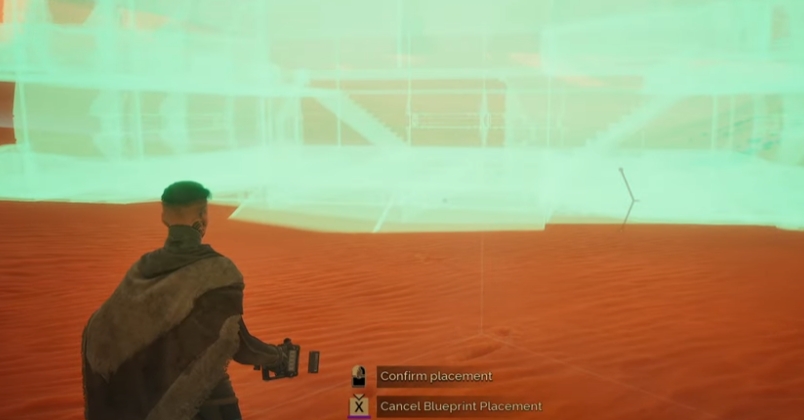
Adjust as Needed: Tweak the design post-placement for better aesthetics or fit.
Pro Tip: Bases on pillars offer more flexibility, as they adapt better to tricky terrain than flat foundation designs. Avoid open sand—sandworms will devour your base!
How Well Does the Blueprint System Work?
The system shines in theory, but its success depends on a few factors:
Terrain Flexibility: Blueprints adapt to uneven land—pillar bases add supports, and foundation designs stack extra layers on inclines. This is promising for flexible placement.
Limitations to Watch: Larger bases on small or restrictive land claims can hit snags, with unsupported elements blocking placement. Test small designs first!
Building Set Access: If a blueprint uses pieces from a set you don't own (e.g., faction-specific styles), you can't fill the holograms until you unlock it. Funcom notes the game should warn you, but it's unclear if this happens when buying or only after placing.
Trading Potential: Sell blueprints at the CHOAM Exchange to earn Solaris, or trade with friends. No copyright protection exists, so buyers can rebuild and resell your design. Funcom plans to monitor this post-launch.
Pro Tip: Stick to flat, secure areas for reliable placement, and verify the building set requirements before purchasing blueprints to avoid frustration.
FAQs About Dune Awakening Blueprint System
What does the Solido Replicator copy in Dune Awakening?
It captures only building pieces (walls, foundations, etc.), not workstations, decorations, or loot inside the base.
Can I copy any base I find in the game?
No, you need owner or co-owner permissions to copy a base—random structures in the world are off-limits without access.
How do I place a blueprint on uneven terrain?
The system auto-adjusts, adding pillars or extra foundations. Walk around the hologram to confirm it fits before proceeding with the build.
What if a blueprint uses building sets I don't have?
You can't fill the holograms until you unlock the set—check for a warning when buying or placing to avoid issues.
Can I protect my blueprint designs from being resold or copied?
No, there's no copyright protection. Buyers can rebuild and resell your design, but Funcom will track this after launch.
Thanks for Reading
You're now ready to master Dune Awakening's blueprint system—copy, store, and rebuild bases with ease, or turn your creativity into Solaras at the CHOAM Exchange! Despite some quirks with terrain and building sets, this feature offers real promise for survival and strategy on Arrakis. Stay tuned to MMOJUGG for more guides to dominate the dunes! 👉 [Explore our Dune: Awakening Ultimate Guides Hub Now]
Table of Content
 Buy Dune Awakening Solari
 Buy Dune Awakening Items
 Dune Awakening Boosting