How to Swap Sietch Servers in Dune Awakening
Last updated on June 19, 2025 by MMOJUGG Team | Game: Dune Awakening Guide | Tags: Dune Awakening System
In Dune: Awakening, navigating the sands of Arrakis is all about strategy, and sometimes that means hopping between Sietch servers to maximize your loot, farm fresh resource nodes, or join friends. Switching Sietches allows you to revisit key locations, such as testing stations or crash sites, but it comes with some limitations. If you're looking to master Arrakis, bookmark our site for more survival tips and check out our Dune: Awakening Solari and Items Store, packed with materials, vehicles, and more to fuel your desert adventures.
This guide, inspired by expert insights, will walk you through how to swap Sietch servers within Worlds, explain why you'd want to, and cover the key limitations to keep in mind. Let's hit the dunes and get started!
Why Swap Sietch Servers?
Sietches in Dune: Awakening are server instances within a World, each hosting a unique version of the Haga Basin (the starting survival map) with 40–60 players. Switching Sietches allows you to:
Re-loot Key Locations: Testing stations (like Imperial Testing Station 71 for the Tarl Cutteray) and PvP crash sites reset per Sietch, letting you farm rare blueprints or items repeatedly.
Farm Fresh Resources: If aluminum, cobalt paste, or other nodes are depleted in your home Sietch, other Sietches offer untouched nodes for farming.
Join Friends: Play with friends or guildmates on their Sietch, retaining your character progress and inventory (though with building restrictions).
Avoid Crowds: Swap to a low-population Sietch (marked as “Medium" or “Low" in the server menu) to farm with less competition or avoid queues during peak hours.
However, you can't transfer characters between Worlds (e.g., from an Asian to a European server), and you're limited to one character per World. Choose our World wisely to stay with friends.
Step-by-Step Guide to Swap Sietch
Switching Sietches is straightforward and doesn't wipe your progress, as your character and inventory persist across Sietches within Worldame World. Here's how to do it:
Prepare for the Swap:
Ensure your inventory has space for loot. Your character carries all items and equipment when switching Sietches.
Bring a vehicle (like an Ornithopter or Buggy Mk5) using a Vehicle Backup Tool. Without one, you'll spawn at Griffin's Reach Trading Post in Haga Basin and face a long trek back to your farming spots or base.
Check your map to note key locations (e.g., Eastern Shield Wall for aluminum or Haga Rift for cobalt paste) you want to revisit in the new Sietch.
Access the Server Menu:
Press Escape to open the main menu.
Select Exit to Main Menu. Your character remains in the World for 30 seconds to prevent data loss—wait this out to avoid glitches.
From the main menu, click the Servers button to view all Worlds and their Sietches.
Choose a Sietch:
Locate your World (e.g., Europe, US East, Asia). You can't switch to Sietches in other Worlds without creating a new character.
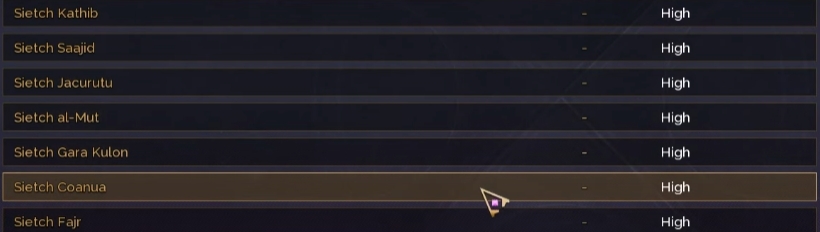
Browse the list of Sietches (up to Worldper World). Each shows population status (High, Medium, Low). Pick a low-population Sietch for less competition or one where your friends are playing.
Click Visit to join the new Sietch. If it's full, you may enter a queue.
Spawn in the New Sietch:
You'll spawn at Griffin's Reach Trading Post in the new Sietch's Haga Basin. Deploy your vehicle (if brought) to travel to farming spots or testing stations.
Your map retains all discovered locations, but your base won't appear unless it's your home Sietch.
Return to Your Home Sietch:
To return, repeat the process: Exit to the main menu, select your home Sietch, and join. You'll spawn back at Griffin's Reach.
Allow 30–60 seconds between swaps to ensure your character data syncs properly.
Pro Tip: If you're farming testing stations (e.g., for the Tarl Cutteray blueprint), check the loot cache's status in each Sietch, as other players may have already looted it.
Limitations When Visiting a Sietch
While swapping Sietches is excellent for farming and socializing, there are restrictions:
No Land Claims: As a visitor, you can't claim land or build a personal base in another Sietch. Your base is tied to your home Sietch.
Limited Building: You can only build on a friend's land if they grant you permission (e.g., via guild or fief access). This is useful for collaborative base-building, but it doesn't allow for independent construction.
Haga Basin Exclusive: Sietch swaps only affect the Haga Basin. Social hubs (like Harko Village) and the Deep Desert are shared across all Sietches in a World, so bases or events there remain consistent.
Inventory Limits: You carry your inventory, but transferring large amounts of resources (e.g., 4,400 aluminum ore) is limited by carry weight unless you use a vehicle with high storage (like a Buggy Mk5).
Tips for Effective Sietch Swapping
To make the most of Sietch hopping, consider these strategies:
Bring a Vehicle: Always carry an Ornithopter or Buggy Mk5 to avoid long walks from Griffin's Reach. Use a Vehicle Backup Tool to transport it between Sietches.
Target Low-Population Sietches: Select Sietches marked as “Low" or “Medium" to farm resources like aluminium or cobalt paste with minimal competition.
Coordinate with Friends: If playing with a guild, ensure everyone picks Worldame World. You can visit each other's Sietches to farm or quest together, even if your home Sietches differ.
Check Server Status: During peak hours, high-population Sietches may have queues. Use tools like LagoFast or GearUP Booster to optimize your connection and reduce lag when swapping.
Farm Strategically: Combine Sietch swaps with resource runs (e.g., Eastern Shield Wall for aluminum, Haga Rift for cobalt paste) or testing station loot (e.g., Imperial Testing Station 71 for the Tarl Cutteray).
FAQs About Swapping Sietch Servers
Q1: Can I swap Sietches without losing my character progress?
A: Yes, your character progress and inventory persist across Sietches within Worldame World. Only the Haga Basin changes per Sietch.
Q2: Why should I switch to a different Sietch?
A: To re-loot testing stations (e.g., for blueprints like the Tarl Cutteray), farm fresh resource nodes, or play with friends on their Sietch.
Q3: Can I build a base in a visited Sietch?
A: No, you can't claim land or build a personal base in a visited Sietch. You can only build on a friend's land with permission.
Q4: What happens if I don't bring a vehicle when swapping Sietches?
A: You'll spawn at Griffin's Reach Trading Post and may need to travel long distances (e.g., 400m) on foot. Always bring an Ornithopter or Buggy.
Q5: Can I swap Worlds like I swap Sietches?
A: No, characters are locked in World. Switching Worlds requires creating a new character, losing all progress from the Worldnal World.
Thanks for Reading
Swapping Sietch servers in Dune: Awakening is a game-changer for farming resources, looting key locations, and teaming up with friends. Stay tuned to MMOJUGG for more tips to rule the sands of Arrakis. 👉 [Explore our Dune: Awakening Ultimate Guides Hub Now]
Table of Content
 Buy Dune Awakening Solari
 Buy Dune Awakening Items
 Dune Awakening Boosting