Easy Inventory & Storage Tips for Dune Awakening
Last updated on August 5, 2025 by MMOJUGG Team | Game: Dune Awakening Guide | Tags: Dune Awakening Tips
Managing your inventory in Dune: Awakening can feel like wrangling a sandworm, especially when you're hauling resources across Arrakis as a solo player. From cluttered backpacks to overflowing chests, staying organized is key to thriving in this unforgiving desert. This guide explores simple methods for transferring storage, optimizing your inventory, and mastering the circuit system for seamless resource management. If these tips help you conquer the dunes, consider bookmarking our site for more Dune: Awakening guides and checking out our Solari and items shop, loaded with materials and vehicles to fuel your adventures.
Setting Up Auto-Deposit Chests
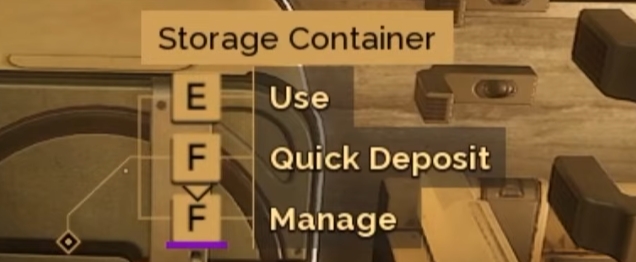
One of the fastest ways to declutter your inventory is by using auto-deposit chests at your base. These chests are designed to sort specific resources, saving you time and hassle. Here's how to set them up:
Organize by Resource Type: Dedicate chests to specific items, like one for metal, granite, and pawn fiber, another for NPC resources (e.g., items dropped by enemies), and a third for ores. This keeps your base tidy and intuitive.
Use Quick Deposit: When you return to base, open your inventory and hit the quick deposit button (default: F, F, F). This instantly transfers matching items from your backpack to the corresponding chests. For example, metal goes to the metal chest, leaving only unsorted items behind.
Store Leftovers Separately: Items that don't belong in auto-deposit chests, like base-building resources, should go into a separate storage container. This ensures your inventory stays clean in seconds.
This system is a game-changer for solo players, letting you dump resources and get back to exploring without tedious manual sorting.
Using a Buggy for Heavy Loads
When you're mining resources at a breakneck pace, your backpack's 175-unit carry limit can become a bottleneck. Enter the buggy—a high-capacity vehicle that simplifies transferring heavy loads. With a cut array equipped, a buggy can hold up to 2,750 units of resources, perfect for massive hauls. Here's how to use it effectively:
Transfer from Buggy to Chest: Instead of ferrying resources from the buggy to a chest by hand, use the inventory transfer option. Open the buggy's storage, select the chest, and move everything directly. This bypasses your backpack's weight limit, saving you multiple trips.
Move Between Chests: Need to relocate resources, like metal, from one chest to another? Use the buggy as a middleman. Load the resources into the buggy's high-capacity storage, drive to the new chest, and transfer them over. This is ideal for reorganizing your base without overloading your character.
Pro Tip: Always park your buggy near your chests to streamline transfers. This method is a lifesaver when setting up an organized storage system for the first time.
Mastering the Circuit System
The circuit system in Dune: Awakening governs the interaction between storage containers and fabricators, automatically pulling and depositing resources. For solo players, understanding circuits can prevent resource mismanagement. Here's the breakdown:
Default Circuit (Circuit 1): By default, all storage containers and fabricators are set to Circuit 1. This means fabricators, like the survival fabricator, can pull resources from any Circuit 1 storage to craft items, even if those resources aren't in your inventory. Outputs from crafting also go to Circuit 1 storage.
When to Change Circuits: Solo players rarely need to adjust circuits, as Circuit 1 works seamlessly for personal use. However, if you want a private chest for valuable items like jur aluminum, set it to a different circuit (e.g., Circuit 8). This prevents fabricators from pulling from it or machines from depositing into it.
Circuit Behavior: If a machine's storage (e.g., for silicone blocks) is full, it will deposit crafted items into any Circuit 1 chest, prioritizing those with matching items. If all matching chests are full, it may dump items into random Circuit 1 chests, which can clutter your storage. To avoid this, leave machine storage untouched unless you have a specific need to redirect outputs.
Multiplayer Consideration: In group play, circuits help split resources. For example, setting your chest to Circuit 2 ensures others' fabricators on Circuit 1 can't use your resources. Solo players can skip this unless hiding items.
Additional Inventory Tips
Prioritize Buggy Upgrades: Invest in a buggy early to handle large resource hauls, especially if you're mining with a cut array.
Keep Chests Near Fabricators: Place auto-deposit chests close to your crafting stations for easy access and circuit compatibility.
Monitor Chest Capacity: Regularly check your chests to prevent overflow, which can lead to random resource deposits in unintended containers.
Use Private Circuits Sparingly: Only switch to unique circuits for sensitive items to avoid complicating your crafting setup.
FAQs About Inventory and Storage in Dune: Awakening
1. How do auto-deposit chests work?
Auto-deposit chests store specific resources (e.g., metal or NPC items). Press the quick deposit button (F, F, F) to transfer matching items from your inventory instantly.
2. How can I move heavy resources without overloading my inventory?
Use a buggy's high-capacity storage (up to 2,750 units) to transfer resources directly from the vehicle to a chest or between chests.
3. What is the circuit system in Dune: Awakening?
Circuits control how storage and fabricators share resources. By default, all use Circuit 1, allowing fabricators to pull from and deposit to any Circuit 1 storage.
4. Should solo players change circuit settings?
Solo players typically don't need to change circuits unless they want a private chest (e.g., on Circuit 8) to protect valuable items from being used or filled.
5. Why are my crafted items going to random chests?
If a machine's storage or matching Circuit 1 chests are full, crafted items may deposit into random Circuit 1 chests. Leave machine storage untouched to minimize this.
Thanks for Reading
Efficient inventory and storage management in Dune: Awakening can transform your solo experience, letting you focus on conquering Arrakis rather than sorting resources. With auto-deposit chests, buggy transfers, and a grasp of the circuit system, you'll keep your base organized and your spice flowing. Stay tuned to MMOJUGG for more tips to dominate the dunes! 👉 [Explore our Dune: Awakening Ultimate Guides Hub Now]
Table of Content
 Buy Dune Awakening Solari
 Buy Dune Awakening Items
 Dune Awakening Boosting