Capycraft Installation: Play Turtle WoW Anywhere (2026 Setup & Ping Fixes)
Last updated on May 25, 2026 by MMOJUGG Team | Game: Capycraft Guide | Tags: Capycraft General
Lots of people are jumping into Capycraft right now, but the biggest headache for English-speaking players is getting the game running properly. Between VPN blocks, translation tools, and fonts, it can feel messy if you don't know the shortcuts. This guide uses the exact process that actually works in 2026. Follow it and you'll be in Eversong Wilds within 20-30 minutes.
Account Creation
Start at the official Capycraft website. If you're in the US or North America, the site is often blocked. Just fire up a free VPN like Proton VPN, connect to any European or Asian server, and register normally.
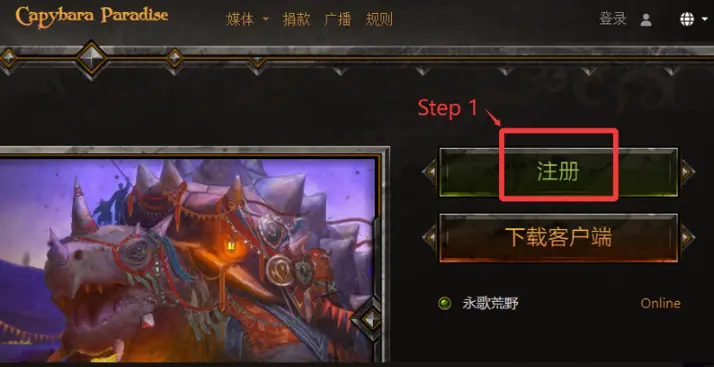
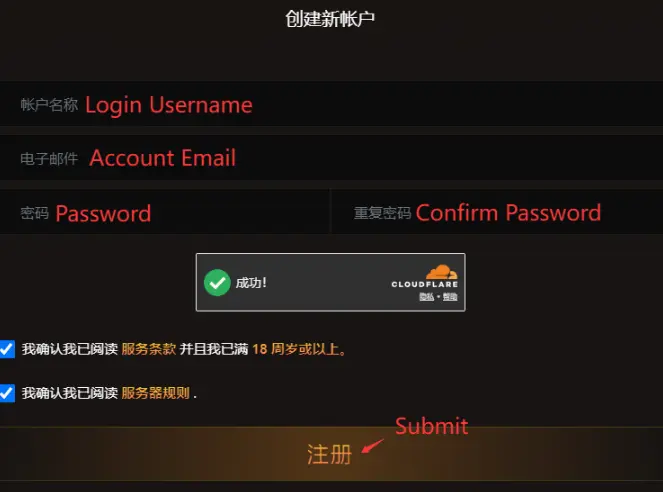
Fill in your username, email, and password. Check the age and rules boxes. You'll probably get a Chinese verification email (check your spam folder), but here's the good part — you don't actually need to verify it to log in to the game. You can skip straight to playing.
Client Setup – Choose Your Path
You have two clean options:
Best route for most people: Use your existing Turtle WoW 1.18.1 client. Open realmlist.wtf in Notepad and replace everything with:
SET realmList "apac.capycraft.io"
SET patchList "apac.capycraft.io"
Save it and mark the file as Read-only. Done.
If you don't have the client, download it directly from the Capycraft website.
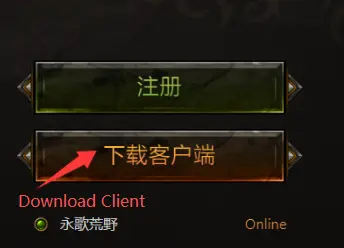
For the official Chinese client, go into the Data folder and delete or rename patch-Z.mpq — this forces the interface into English.
Setting Up English Translation (The Game Changer)
This is what makes Capycraft actually playable for non-Chinese speakers.
Download the latest Turtle Wow Translate addon.
Extract it and copy the WowTranslate folder into your Interface\AddOns folder.
Create a new Fonts folder in your main game directory and add the Chinese font files (community links usually bundle these together). This fixes Chinese character display for names and quests.
(Optional but recommended) Add the performance DLLs, especially Nam Power. Put them in the main folder and list them in DLLs.txt (case-sensitive).
Run the translation tool before launching WoW. The addon translates chat in real time and gets better almost daily as the community updates it.
Reducing Network Latency for Smooth Play
Direct connection from the US or Europe usually sits between 200-250ms. It's playable for casual PvE, but you'll feel the difference in responsiveness during combat.
For much better results — around 100ms and far more stable — I strongly recommend using our solution for WoW Titan Reforged. Check out the full setup details (Client Installation, Accounts, Language, and the "Reducing Network Latency for Smooth Play" section) in this guide. Combined with Nam Power, it makes the higher ping to Asian servers feel a lot closer to normal.
Quick Setup Checklist
Account created on capycraft.io
Realmlist pointing to apac.capycraft.io
Wow Translate + Fonts installed
Optional DLLs added
Realm: Eversong Wilds
FAQs on Capycraft Installation
How do I register if the Capycraft website is blocked?
Use a free VPN (Proton VPN works fine). Once the account is created, you usually don't need the VPN to actually play the game.
Do I need the verification email to log in?
No. You can log in directly through wow.exe even if you never receive the email.
Can I use my old Turtle WoW client?
Yes, and it's the easiest way. Just update the realmlist.wtf file and you're good. Most of your old addons will still work.
How do I make Chinese text and names show up correctly?
Download the font pack and place the files in a new Fonts folder in your main WoW directory. This is essential for proper translation and quest readability.
Is the ping too bad for Western players?
Baseline is 200-250ms, which is acceptable for most PvE. Using the Titan Reforged method can drop it to around 100ms with much better stability, making dungeons and raids feel smoother.
What should I do about antivirus warnings?
DLL files often get flagged. Add exceptions for your Capycraft folder. Only use files from trusted community sources.
Thanks for Reading
That's it — you should now be fully set up and ready to enjoy Capycraft. Once the translation and fonts are sorted, the server feels surprisingly welcoming. Stay tuned to MMOJUGG for more Capycraft guides, updates, and Classic+ content. See you in Azeroth. If you need some starting gold or consumables once you're in, feel free to check out our WoW Capycraft Gold Shop options.
 Buy Capybara WoW (Capycraft) Gold
 Capybara WoW (Capycraft) Boosting